Request access Book a demo Log in
01 — 04

The carrier's back office, in one place.

FLEETBAQ turns every load and mile into accurate driver pay and clean settlements — so you're out of spreadsheets and back to moving freight.

02 — 04

Every part of the office, built into one system.

Loads, driver pay, fuel, IFTA and documents — each one lands where it belongs, the moment it happens.

03 — 04

Paid, filed and settled before it leaves the yard.

Driver pay and the settlement are done when the load is. Not on Friday. Not at month end.

04 — 04  ·  Built by a working carrier · Fresno, CA

Nothing left on your desk.

The whole office rides in the driver's pocket — loads, pay, documents, settlements. You run trucks.

Driver pay computed the moment the load is delivered
IFTA miles logged by state, automatically
Settlement filed the same day — with the receipt to prove it
$0.00
PAID
PAID
Settlement · Load #10428
Fresno, CA → Denver, CO
Loaded miles1,180 mi
Line haul @ $0.50/mi$590.00
Reimbursements+ $85.00
Driver pay$675.00

01What FLEETBAQ is

The office behind the trucks.

Loads, drivers, invoices, pay and IFTA run in one system — updated from the cab, and ready when the broker, the driver or your accountant asks.

  • Web office

    Dispatch, billing, payroll and reports, in any browser.

  • FLEETBAQ Driver

    The driver's app for iPhone and Android, included with your fleet.

  • Hardware

    Nothing to install in the truck. Your ELD stays where it is.

  • Built by

    A working carrier in Fresno, California.

02The load, end to end

One load.
Booked to paid in five clicks.

Book on DAT, Truckstop, 123Loadboard or Trucker Path the way you always do. From the moment the rate con lands in your email, FLEETBAQ carries the load the rest of the way.

  1. 01Booked on your load board
  2. 02Rate con read from your email
  3. 03Built in Open loads
  4. 04Driver, truck, pay · sent
  5. 05Delivered, papers in
  6. 06Broker emailed · paid

03Inside FLEETBAQ

The real app. Not a mock-up.

Every screen here is FLEETBAQ itself — the office on the laptop, FLEETBAQ Driver on the phone — running a demo fleet.

01 / 18 · Dashboard
Your command center

The whole fleet on one dashboard.

Gross vs net for every month, where the money goes, and each truck’s loads, miles, fuel, pay and net — all on one screen.

Web office + driver app

Dispatch on the laptop.
Accepted in the cab.

Pick a load, pick a driver, hit send — it lands on their phone in seconds. FLEETBAQ Driver is included with your fleet.

That's the FLEETBAQ Driver app — free with your fleet. Photos, PODs, and statuses flow straight back to the office.

iPhoneAndroidAny browser
Documents & photos

Snapped in the cab.
PDF in the office.

Driver photographs the BOL, POD, or seal — FLEETBAQ scans it into a clean white-page PDF and it lands on the load in the office in seconds.

No email chains, no blurry photos in texts — every document arrives as a clean, readable scanned PDF, filed on the right load automatically.

Delivery · Invoice · Broker email

Delivered in the cab.
Billed from the office.

The driver taps Delivered. The broker’s invoice fills in from the load, and the delivery email writes itself — tick the files, send.

No retyping the load, no digging for the POD — the invoice and the paperwork reach the broker the day it delivers.

Email

Connect any email.
Every rate con becomes a load.

Gmail, Outlook or any other mailbox — GoDaddy, Zoho, Yahoo, your own domain. Connect it once: every rate con that comes in is read and lands in Open loads, ready for a truck.

Open loads

Rate cons land by themselves.
Ready to dispatch.

Every rate con from your email is read for you — broker, load #, rate, every stop — and lined up by pickup day. Pick the truck and the driver, and the trip fills itself in.

Ready for Load

Every empty truck. Every waiting trailer.
On one map.

A truck that delivered with no next load, a trailer waiting at a shipper — they show up by themselves. Send truck lists your trucks by distance, and the new trip opens filled in.

Owner-operator dispatch

Hand a load to an owner-operator.
See your cut before it goes.

Send it at their usual terms — per mile, flat or a percentage of the rate. They accept in their own FLEETBAQ and put their own driver on it.

Your officeYour Fleet Inc

Their officeQuilloak Transport

The owner-operator runs his own FLEETBAQ. On flat or per-mile pay, the broker rate stays private.

Live tracking

Every truck on the map. Live.

Location, speed, fuel and the driver for every truck — and its dash camera live, one click away. Refreshed on its own.

Dashcams

Your Azuga dashcams. Right in FLEETBAQ.

Sign in with Azuga once. Each truck’s camera — online or standby, fuel, its last event on video — and live view, one click away.

Driver GPS

Track every driver on the load. Live.

Live location from the driver app while they’re on the load — the route from pickup to delivery, and a tracking link for the broker.

Fuel · IFTA

Fuel comes in by itself. IFTA adds it up.

Connect Relay once. Every fill-up — truck, driver, station, state, gallons and price — comes in each hour and counts in IFTA by state.

New · Driver ↔ office chat

Talk to every driver. In context.

A real chat room tied to the load — the check-call, the BOL photo, the “running 30 late,” all in one thread instead of scattered texts.

Driver files

Every driver’s file, audit-ready.

Medical card, CDL and annual MVR count down for every driver — the one due first sits on top. Checkr background checks are coming soon.

Payday, automated

Payroll in seconds.
Paystub in their pocket.

Close the week with one click — every driver's settlement is calculated, checked, and delivered straight to their phone.

No spreadsheets, no math, no "what do I get this week?" texts — the numbers land with the driver the moment you close payroll.

Background checks · Powered by Checkr

Screen drivers without leaving FLEETBAQ.

Order a check from the driver’s row. Checkr runs every search and the result comes back on its own. Opening to fleets soon.

Background checks through Checkr. Consumer reports are prepared by Checkr, Inc., a consumer reporting agency.

Taxes & renewals

Taxes and renewals — handled.

A profit & loss your accountant can file from, and every insurance, registration, medical card and CDL renewal counted down with 30 / 60 / 90-day warnings.

Hiring

Find CDL drivers.
Hire them. Invite them in.

Browse drivers who posted a profile on FLEETBAQ Jobs, filter by state, class and equipment, then call or email. Send an invite code and they’re in FLEETBAQ Driver.

04FLEETBAQ Driver

The office, in the driver's pocket.

FLEETBAQ Driver comes with your fleet, for iPhone and Android. Drivers join with the invite code you send them — and everything they do lands on the right load.

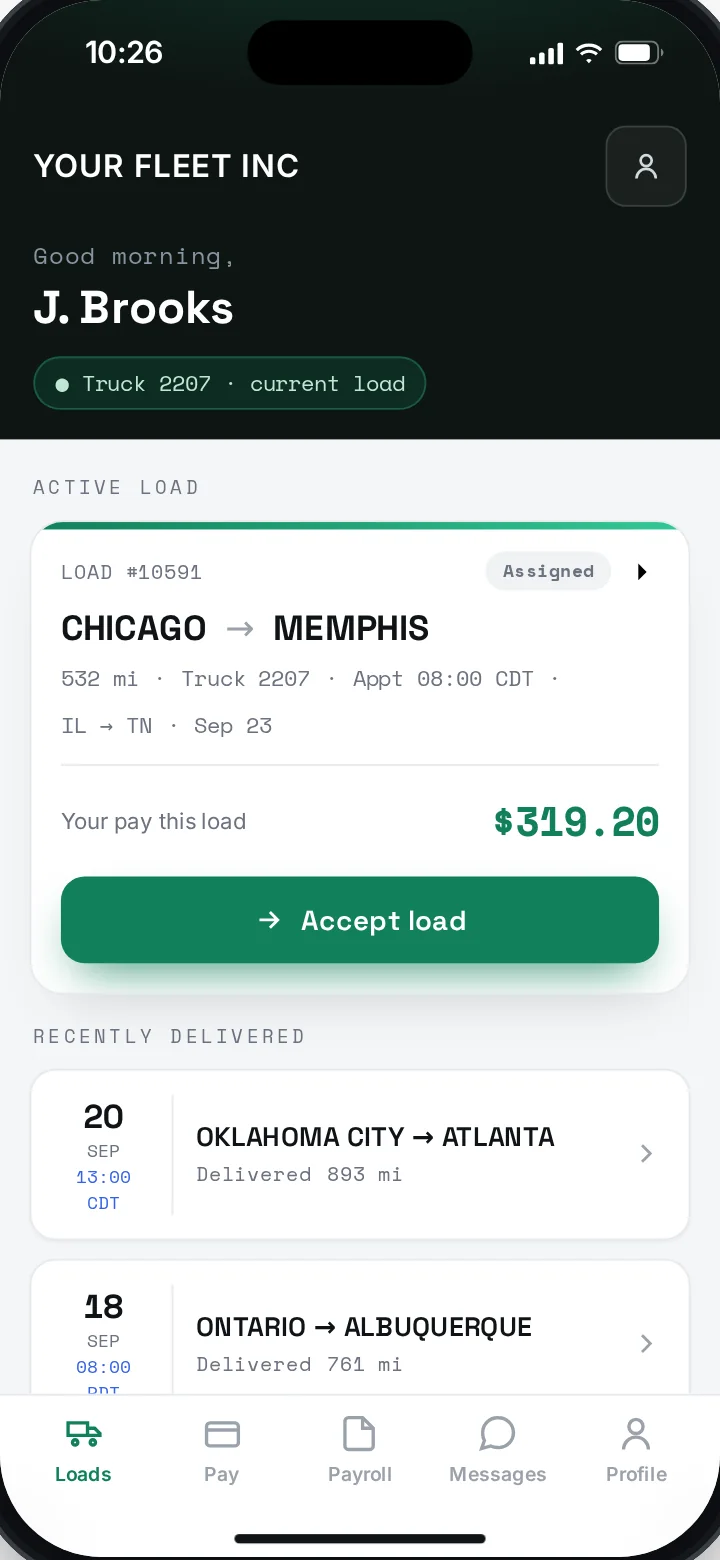
FLEETBAQ Driver: J. Brooks' active load, Chicago to Memphis, with his pay for the load and the Accept load button
The loadStops, appointment and his pay for this load.
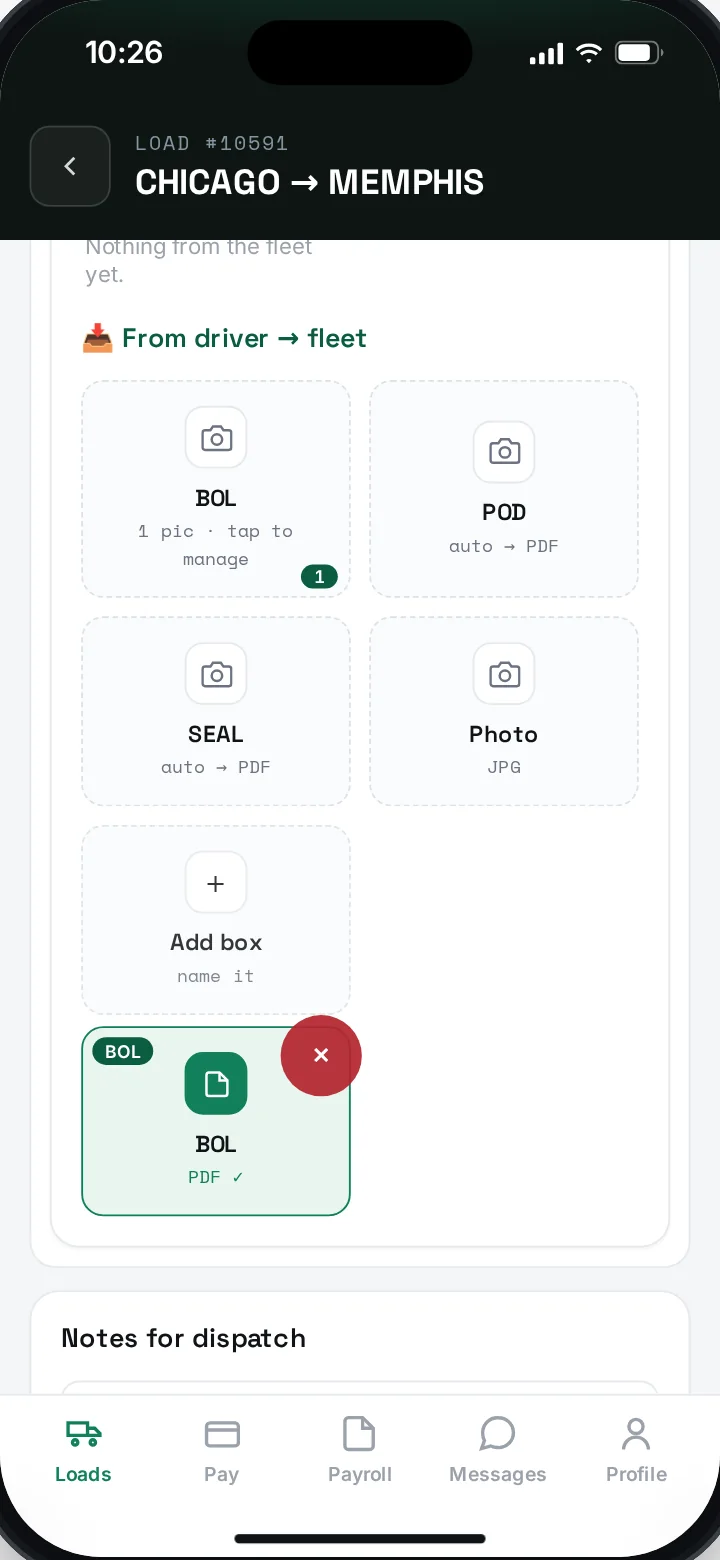
FLEETBAQ Driver: load documents with BOL, POD, seal and photo boxes; the BOL has been scanned to PDF
DocumentsBOL scanned to PDF, filed on the load.
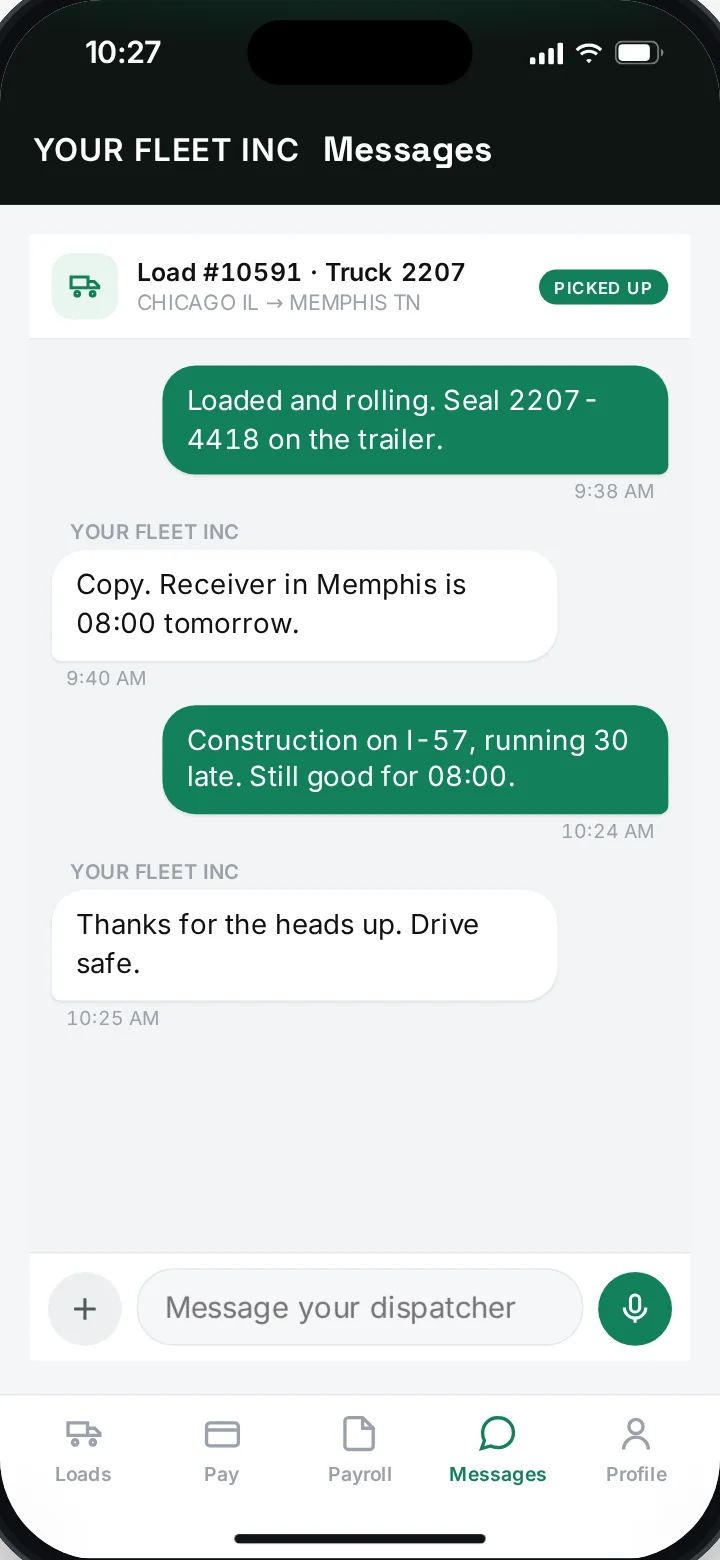
FLEETBAQ Driver: messages between J. Brooks and dispatch about load 10591
MessagesThe whole trip in one thread with dispatch.
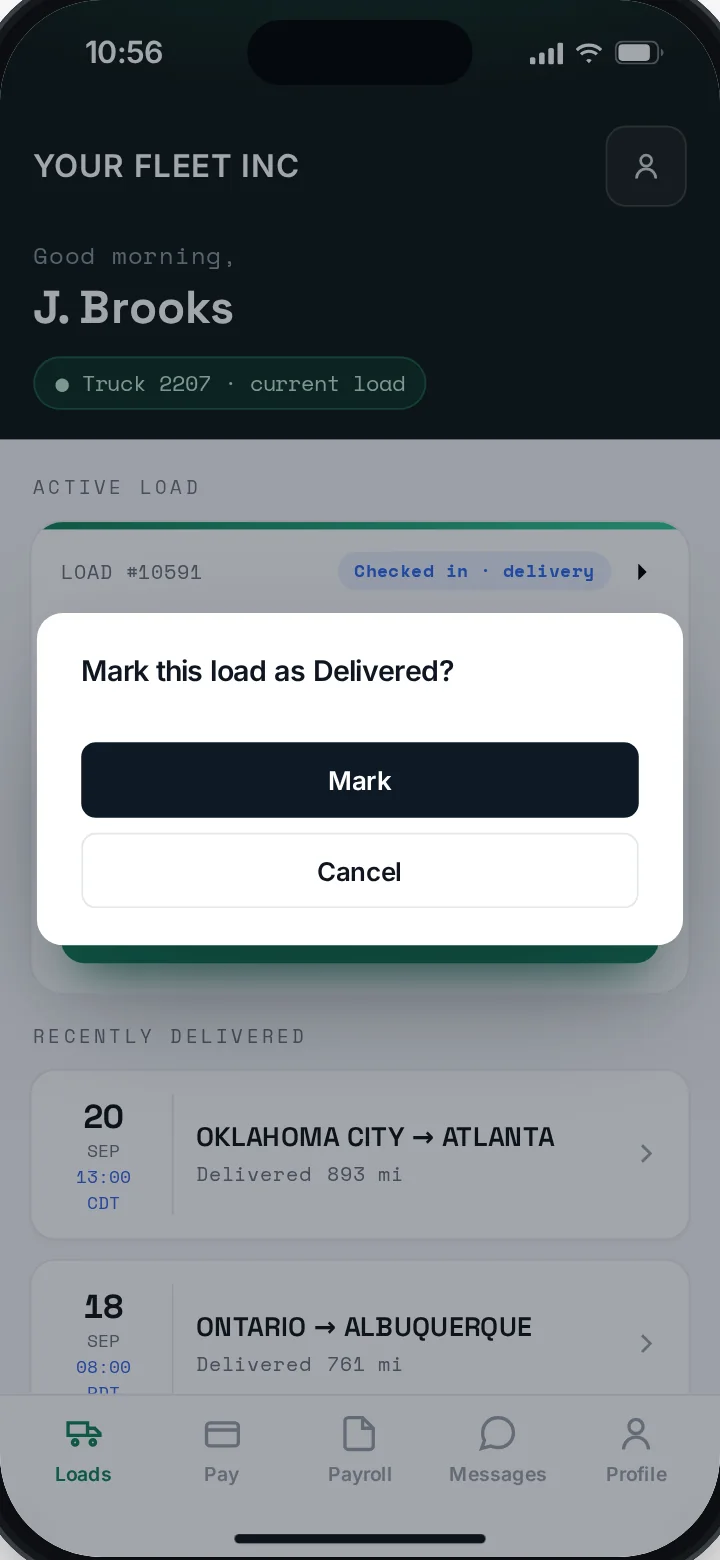
FLEETBAQ Driver: the Mark this load as Delivered confirmation
DeliveredOne tap at the receiver stamps the time.
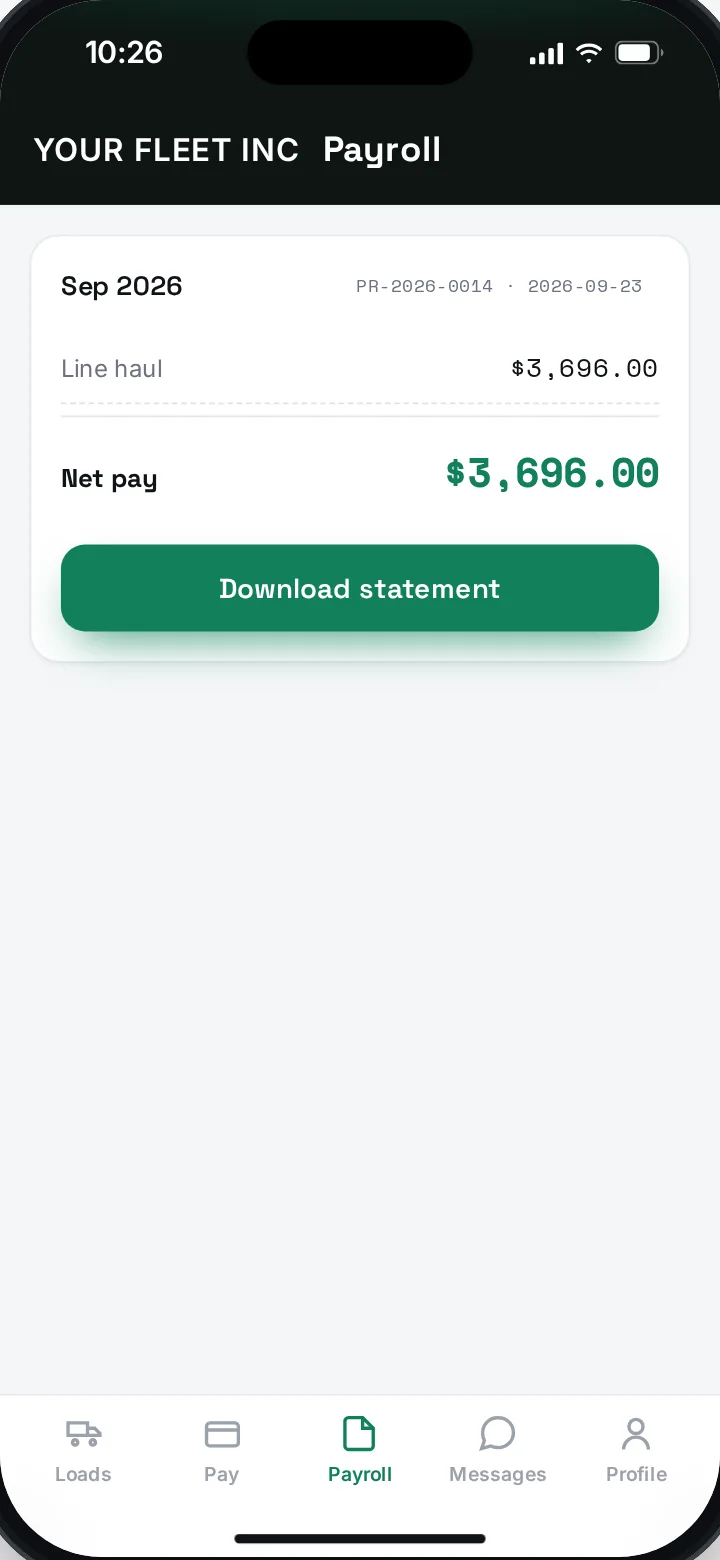
FLEETBAQ Driver: the September 2026 pay statement with net pay and a Download statement button
PayThe statement, on his phone, when you close the week.

05Your data

Your fleet's data stays your fleet's.

Your loads, drivers, invoices and documents belong to your company — and every person sees only their part.

  • Your company only

    Other companies on FLEETBAQ can't see your loads, drivers or documents.

  • Owner and driver roles

    Drivers see their own loads, documents and pay — nothing else.

  • Your accounts, your login

    You connect factoring and email with your own login — and disconnect any time.

  • Location with limits

    Shared around the driver's loads, off at sign-out. A broker's link shows the truck — never the driver's name.

06Who builds it

Built by a carrier, for carriers.

FLEETBAQ wasn't drawn up in a boardroom. It was built in Fresno, California, to run a working carrier's own trucks — the loads, the pay, the settlements, the IFTA — and then opened to other fleets. That's why it starts with the office, not the dashcam.

Built in
Fresno, California
Built for
A working carrier's own trucks
Now
Open to other fleets
California · USA Pacific time
36.74° N119.79° W
Fresno, CAWhere FLEETBAQ is built

07Questions

Straight answers.

Anything else — send us a message.

Do I need to buy hardware?
No. FLEETBAQ runs in the browser, and FLEETBAQ Driver runs on your drivers' phones. Location comes from the driver app, so there's nothing to install in the truck.
Does it replace my ELD?
No. Keep your ELD for hours of service and logs. FLEETBAQ runs the office side: loads, documents, billing, driver pay and IFTA.
Who is FLEETBAQ for?
Carriers and owner-operators — roughly one to fifty trucks — who run dispatch and pay out of spreadsheets, texts and email today and want one system that does the math.
How do my drivers get the app?
FLEETBAQ Driver is on the App Store and Google Play, included with your fleet. Add a driver in FLEETBAQ and send them an invite code; they enter it in the app and they're on your fleet.
How is driver pay figured?
From the loads. Each load carries its miles and the driver's rate; FLEETBAQ adds reimbursements, applies deductions and rolls the week into a settlement you review and close. The driver sees the pay statement on their phone.
Can I invoice brokers and factor from it?
Yes. Invoices fill from the load and go to the broker by email with the POD and BOL attached. If you factor with RTS Financial, the packet goes to RTS from the load, and you can see what's been funded and paid.
Does it handle IFTA?
Yes. Miles and fuel are kept by state and province through the quarter — every IFTA jurisdiction, the lower 48 and ten Canadian provinces — so the quarterly worksheet is ready when the return is due. Pay for fuel with Relay? Every fill-up comes in on its own and counts in the right state.
Can I dispatch to owner-operators?
Yes. Connect an owner-operator's company, send them loads at flat, per-mile or percentage pay, and see your margin on each one. On flat and per-mile pay the broker rate stays private; on percentage pay the rated freight bill goes with the load, as federal leasing rules require.
Who can see my data?
Only your company. Other companies can't see your data, and drivers see only their own loads and pay.
How do we get started?
Request access or book a demo. Access is by invitation: we set up your company with you — authority, drivers, trucks — and you invite your drivers from there.

08Get set up

Run the office from one place.

Tell us about your fleet — how many trucks, how you pay drivers, who you factor with. We'll set FLEETBAQ up with you.

Send us a message

Questions about FLEETBAQ, your account or a partnership — we read every one.

We use this only to get back to you. Privacy Policy.

Trusted & secure

Request access

Tell us about your fleet.

Access is by invitation: we set up your company with you — authority, drivers, trucks. A few minutes here saves a call later.

You

Your company

Your fleet

What you haul optional

What you need

What you want first optional

We use this only to get back to you. Privacy Policy.

Book a demo

See FLEETBAQ with your own loads.

Pick a time that works. We’ll walk you through dispatch, driver pay, IFTA and the driver app.

You

Your demo

How should we meet?

What should we show you? optional

We’ll confirm the time by email. Privacy Policy.